Difference between revisions of "Template:Temperature Monitoring Physical Setup"
| (25 intermediate revisions by the same user not shown) | |||
| Line 1: | Line 1: | ||
| + | |||
| + | [[File:Thermal_Solution_side_diagram.jpg|450px]] | ||
===Video Instructions=== | ===Video Instructions=== | ||
<embedvideo service="youtube">https://youtu.be/_zOjthHmU60</embedvideo> | <embedvideo service="youtube">https://youtu.be/_zOjthHmU60</embedvideo> | ||
===Step by Step Instructions=== | ===Step by Step Instructions=== | ||
| − | 1. | + | ====Mounting Adapter Plates==== |
| + | The mounting brackets/plates must be installed to both the camera and black body device | ||
| + | |||
| + | <gallery> | ||
| + | File:Temperature_Monitoring_-_Physical_Setup_-_Mounting_Plates.jpg|RQW026-00 Brackets | ||
| + | File:Temperature_Monitoring_-_Physical_Setup_-_Black_body_mount.jpg|Black body bracket installation | ||
| + | File:Temperature_Monitoring_-_Physical_Setup_-_camera_mount.jpg|Thermal camera bracket installation | ||
| + | </gallery> | ||
| + | |||
| + | To attach the tripod: | ||
| + | |||
| + | <gallery> | ||
| + | File:Temperature_Monitoring_-_Physical_Setup_-_Tripod_1.jpg|Use the center hole to screw into tripod | ||
| + | File:Temperature_Monitoring_-_Physical_Setup_-_Tripod_2.jpg|Tripod installed | ||
| + | </gallery> | ||
| + | |||
| + | ====Suggested Physical Layout==== | ||
| + | <gallery mode="packed-hover"> | ||
| + | File:Temperature_Monitoring_-_Physical_Setup_-_Physical_Layout_Side_View_Diagram.jpg|Side view diagram | ||
| + | File:Temperature_Monitoring_-_Physical_Setup_-_Physical_Layout_Top_View_Diagram.jpg|Top view diagram | ||
| + | </gallery> | ||
| + | <gallery> | ||
| + | File:Temperature_Monitoring_-_Physical_Setup_-_Physical_Layout_Camera_Height.jpg|'''Camera height:''' 2m (6.56 ft) | ||
| + | File:Temperature_Monitoring_-_Physical_Setup_-_Physical_Layout_Black_body_Height.jpg|'''Black body height:''' 1.8m (5.9 ft) | ||
| + | File:Temperature_Monitoring_-_Physical_Setup_-_Physical_Layout_Minimum_Distance.jpg|'''Minimum distance between both:''' 3m (9 ft) | ||
| + | File:Temperature_Monitoring_-_Physical_Setup_-_Physical_Layout_Side_View_Diagram.jpg|Side view diagram | ||
| + | File:Temperature_Monitoring_-_Physical_Setup_-_Physical_Layout_Top_View_Diagram.jpg|Top view diagram | ||
| + | </gallery> | ||
| + | |||
| + | ====JQ-D70Z Black body Setup==== | ||
| + | <gallery> | ||
| + | File:Temperature_Monitoring_-_Black_body_power.jpg|Plug in the power and turn on | ||
| + | File:Temperature_Monitoring_-_Black_body_temp.jpg|Allow the device to warm up to 35.0 C | ||
| + | </gallery> | ||
Latest revision as of 17:44, 7 April 2020
Error creating thumbnail: File missing
Contents
Video Instructions
Step by Step Instructions
Mounting Adapter Plates
The mounting brackets/plates must be installed to both the camera and black body device
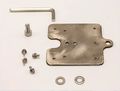
RQW026-00 Brackets
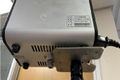
Black body bracket installation
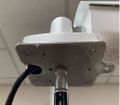
Thermal camera bracket installation


To attach the tripod:
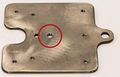
Use the center hole to screw into tripod
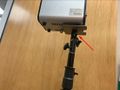
Tripod installed


Suggested Physical Layout
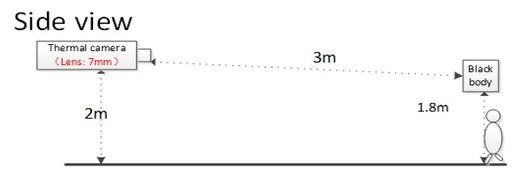
Side view diagram
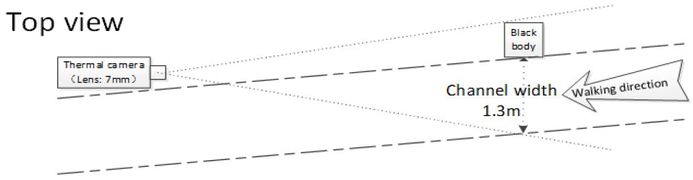
Top view diagram


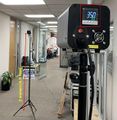
Camera height: 2m (6.56 ft)
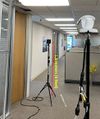
Black body height: 1.8m (5.9 ft)
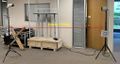
Minimum distance between both: 3m (9 ft)
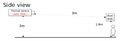
Side view diagram
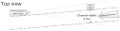
Top view diagram


JQ-D70Z Black body Setup
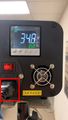
Plug in the power and turn on
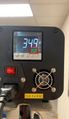
Allow the device to warm up to 35.0 C


